Creating Controllers and Actions
The Controller classes are stored in the folder EXT:sjr_offer/Classes/Controller/. The name of the
Controller is composed by the name of the Domain Model and the Suffix
Controller. So the Controller
\MyVendor\SjrOffers\Controller\OfferController is assigned
to the Aggegate Root Object
\MyVendor\SjrOffers\Domain\Model\Offer. And the name of the
Class file is OfferController.php.
The Controller class must extend the class
\TYPO3\CMS\Extbase\Mvc\Controller\ActionController which is
part of Extbase. The individual Actions are combined in seperate methods.
The method names have to end in Action. The body of
OfferController thus looks like this:
<?php

namespace MyVendor\SjrOffers\Controller;

use TYPO3\CMS\Extbase\Mvc\Controller\ActionController;

class OfferController extends ActionController
{
   // Action methods will be following here
}
When realizing the desired tasks through Action methods you will often stumble upon very similar flows and patterns. Each task will be carried out by a single Action or a chain of Actions:
- A list of Domain Objects is to be displayed.
- A single Domain Object is to be displayed.
- A new Domain Object is to be created.
- An existing Domain Object is to be edited.
- A Domain Object is to be deleted.
We will shed some light on these recurring patterns in the following sections. Together with the schedule model you will learn the background to generate your own flows.
Tip
Note that you are free to choose the method names for your Actions as you like. Nevertheless we recommend to stick to the names presented here, to help other developers to find their way through your code.
Flow Pattern "display a list of Domain Objects"
The first pattern in our example fits the action "display
a list of all offers". One action method usually will be enough
for implementing this. We choose indexAction as
name of the method:
// …
/**
 * @var OfferRepository
 */
private $offerRepository;

/**
 * Inject the offer repository
 *
 * @param \MyVendor\SjrOffers\Domain\Repository\OfferRepository $offerRepository
 */
public function injectOfferRepository(OfferRepository $offerRepository)
{
   $this->offerRepository = $offerRepository;
}

/**
 * Index Action
 *
 * @return string
 */
public function indexAction()
{
    $offers = $this->offerRepository->findAll();
    $this->view->assign('offers', $offers);
    return $this->view->render();
}
This can be simplified even more. As described in chapter 4 in
section "controlling the flow", it is not necessary to return the rendered
content. Furthermore we avoid initializing the variable
$offers, which we only use once. So we get:
/**
 * Index Action
 *
 * @return void
 */
public function indexAction()
{
    $this->view->assign('offers', $this->offerRepository->findAll());
}
initializeAction
In old TYPO3 Versions the initializeAction() was used to get the repository instance.
Later we can use this action, to modify the Request, before the property mapper is executed or
intgrate JavaScript libraries.
The ActionController not only calls the method initializeAction(), which is executed before any
Action in the Controller, but also a method in the Form of
initialize*Foo*Action(), which is called only before the method
*foo*Action().
Tip
The trick of implementing an empty method body in the super class, which is the "filled" in the subclass is called Template Pattern.
Flow Pattern "display a single Domain Object"
The second pattern is best put into action by a single method as
well. We call it showAction(). In contrast to
indexAction we have to to tell this method from
outside which Domain Object is to be displayed. In our case, the offer to
be shown is passed to the method as Argument:
/**
 * Show action
 *
 * @param \MyVendor\SjrOffers\Domain\Model\Offer $offer The offer to be shown
 * @return string The rendered HTML string
 */
public function showAction(\MyVendor\SjrOffers\Domain\Model\Offer $offer)
{
   $this->view->assign('offer', $offer);
}
Usually the display of a single Object is called by a link in the frontend. In our example extension it connects the list view by something like the following URL:
http://localhost/index.php?id=123&tx_sjroffers_pi1[offer]=3&tx_sjroffers_pi1[action]=show&tx_sjroffers_pi1[controller]=Offer
Due to the 2 Arguments
tx_sjroffers_pi1[controller]=Offer and
tx_sjroffers_pi1[action]=show, the dispatcher of Extbase
passes the request to the OfferController. In the
request we find the information that the Action show is to be called. Before passing on the further processing to
the method showAction(), the Controller tries to
map the Arguments received by the URL on the arguments of the method.
Extbase maps the arguments by their names. In our example Extbase detects,
that the GET Argument tx_sjroffers_pi1[offer]=3 corresponds to the method argument
$offer:
showAction(\MyVendor\SjrOffers\Domain\Model\Offer *$offer*).
The type of this Argument is fetched by Extbase from the method signature:
showAction(*\MyVendor\SjrOffers\Domain\Model\Offer* $offer).
In case this so called Type Hint should not be present,
Extbase reads the type from the annotation written above the method:
@param *\MyVendor\SjrOffers\Domain\Model\Offer* $offer.
After successful assigning, the value of the incoming argument has
to be casted in the target type as well as checked for validity (read more
about validation in chapter 9 in section "Validating Domain Objects"). In
our case the incoming value is "3". Target type is the class
\MyVendor\SjrOffers\Domain\Model\Offer. So Extbase
interprets the incoming value as uid of the object to be created and sends
a request to the Storage Backend to find an Object
with this uid. If the object can be reconstructed fully valid it is passed
to the method as argument. Inside of the method
showAction() the newly created object is passed on
to the view, which is taking care of the HTML output as usual.
Tip
Inside of the template you can access all properties of the Domain Object, including all existing child objects. Thus this Flow Pattern does not only cover single domain objects but, in the event, also a complex aggregate.
If an Argument is identified as invalid, the already implemented
method errorAction() of
ActionController is called instead of the method
showAction(). The method then generates a message
for the frontend user and passes the processing to the previous Action, in
case it is given. The latter is especially useful with invalid form field
input as you'll see in the following.
Flow Pattern "creating a new Domain Object"
For the third Flow Pattern, the one for creating a new Domain
Object, two steps are required: First, a form for inputting the Domain
Data has to be shown in Frontend. Second, a new Domain Object has to be
created (using the incoming form data) and put in the appropriate
Repository. We're going to implement these two steps in the methods
newAction() `and
:php:`createAction()
.
Tip
We already described these steps in chapter 3 in section "Alternative route: creating a new posting". We now shortly revise this Flow using our example extension and focus on some further aspects.
First the method newAction() is called by a
Link in frontend with the following URL:
http://localhost/index.php?id=123&tx_sjroffers_pi1[oranization]=5&tx_sjroffers_pi1[action]=new&tx_sjroffers_pi1[controller]=Offer
Extbase instantiates the Organization `Object
which is mapped to the Argument :php:`$organization, just
as it was the case with the Offer object in the
method showAction(). In the URL are no information
(yet) though, which value the Argument $newOffer shall have. So the default value
(=null) set in the method signature is used. With
these Arguments, the controller passes the further processing to the
method newAction().
/**
 * @param \MyVendor\SjrOffers\Domain\Model\Organization $organization The organization
 * @param \MyVendor\SjrOffers\Domain\Model\Offer $offer The new offer object
 * @return string An HTML form for creating a new offer
 * @dontvalidate $newOffer
 */
public function newAction(\MyVendor\SjrOffers\Domain\Model\Organization $organization, \MyVendor\SjrOffers\Domain\Model\Offer $newOffer = null)
{
    $this->view->assign('organization', $organization);
    $this->view->assign('newOffer', $newOffer);
    $this->view->assign('regions', $this->regionRepository->findAll());
}
This action passes to the view in organization the Organization object, in newOffer
null (to begin with) the and in region all Region Objects contained in the
RegionRepository. The view creates the output of
the form in frontend, using a template, which we focus on in chapter 8 in
section "Template Creation by example". After the user filled in the data
of the offer and submitted the form, the Method
createAction() is called. It expects as Arguments
an Organization `Object and an Object of the class
:php:MyVendorSjrOffersDomainModelOffer`. Therefore Extbase
instantiates the Object and "fills" its Properties with the appropriate
Form data. If all Arguments are valid, the Action
createAction() is called.
The new offer is allocated to the organization and inversly the organization is allocated to the offer. Thanks to this allocation Extbase will cause the persistence of the new offer in the dispatcher before returning to TYPO3.
After creating the new offer, the appropriate organization is to be
displayed with all of its offers. We therefore start a new request
(request-response-cycle) by redirecting to
showAction() of the
OrganizationController using the Method
redirect(). The actual organization is hereby
passed on as an argument. Inside the
ActionController you have the following Methods for
redirecting to other Actions at your disposal:
Using the redirect() Method, you can start a
new request-response-cycle on the spot, similar to clicking on a link: The
given Action (specified in $actionName) of the
appropriate controller (specified in
$controllerName) in the given extension (specified
in $extensionName) is called. If you did not
specify a controller or extension, Extbase assumes, that you stay in the
same context. In the fourth parameter $arguments
you can pass an Array of arguments. In our example:php:`
array('organization' => $organization)` <remark>TODO:
"organization" should be "emphasis" in addition to "classname". I did not
get it, sorry!</remark> would look like this in the URL:
tx_sjroffers_pi1[organization]=5. The Array key is
transcribed to the parameter name, while the organization object in
$organization is transformed into the number 5,
which is the appropriate UID. If you want to link to another page inside
the TYPO3 installation, you can pass its uid in the 5th parameter
($pageUid). A delay before redirecting can be
achieved by using the 6th parameter ($delay). By
default the reason for redirecting is set to status code 303 (which means
See Other).You can use the 7th parameter
($statusCode) to override this (for example with
301, which means Moved Permanentely).
In our example, the following code is sent to the Browser. It provokes the immedeate reload of the page with the given URL:
The Method redirectToURI() corresponds to the
Method redirect(), but you can directly set a URL
respectively URI as string, e.g. <remark>TODO: insert Code</remark>. With
this, you have all the freedom to do what you need. The Method
forward(), at last, does a redirect of the request
to another Action on the spot, just as the two redirect Methods. In
contrast to them, no request-response-cycle ist started, though. The
request Object is only updated with the details concerning Action,
Controller and Extension, and then passed back to the dispatcher for
processing. The dispatcher then passes on the actual
Request- and
Response- Objects to the appropriate Controller.
Here, too, applies: If no Controller or Extension is set, the actual
context is kept.
This procedure can be done multiple times when calling a page. There is the risk, though, that the process runs into an infinite loop (A redirects to B, B redirects to A again). In this case, Extbase stops the processing after some steps.
There is another important difference to the redirect Methods. When
redirecting using the Method forward(), new objects
will not (yet) be persisted to database. This is not done until at the end
of a request-response-cycle. Therefore no UID has yet been assigned to a
new Object and the transcription to a URL parameter fails. You can
manually trigger the action of persisting before the redirection, by using
Tx_Extbase_Dispatcher::getPersistenceManager()->persistAll(),
though.
When calling the Method createAction(), we
already described the case of all Arguments being valid. But what happens,
if a Frontend user inserts invalid data - or even manipulates the form to
deliberately attack the website?
Tip
You find detailed information about validation and security in chapter 9
Fluid adds multiple hidden fields to the form generated by the
Method newAction(). These contain information about
the origin of the form (__referrer) as well as, in
encrypted form (__hmac), the structure of the form
(shorted in the example below).
If now a validation error occurs when calling the Method
createAction(), an error message ist saved and the
processing is passed back to the previous Action, including all already
inserted form data. Extbase reads the neccessary information from the
hidden fields:php:__referrer. In our case the Method
newAction() is called again. In contrast to the
first call, Extbase now tries to create an (invalid)
Offer Object from the form data, and to pass it to
the Method in $newOffer. Due to the annotation
@dontvalidate $newOffer Extbase this time acceptes
the invalid object and displays the form once more. Formerly filled in
data is put in the fields again and the previously saved error message is
displayed if the template is intenting so.
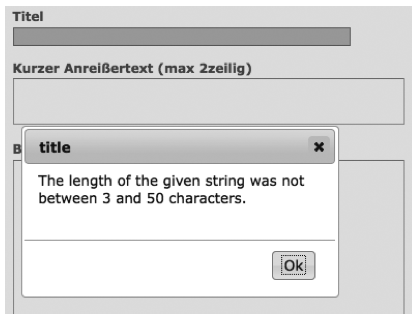
Figure 7-1: Wrong input in the form of an offer leads to an error mesage (in this case a modal JavaScript window)
Tip
Standard error messages of Extbase are not yet localized in Version 1.2. In section "Localize error messages" in chapter 8, we describe a possibility to translate them too, though.
Using the hidden field __hmac, Extbase
compares in an early stage the structure of a form inbetween delivery to
the browser and arrival of the form data. If the structure has changed,
Extbase assumes an evil assault and aborts the request with an error
message. You can skip this check by annotting the Method with
@dontverifyrequesthash, though. So you have two annotiations for Action
Methods at your disposal:
@dontvalidate*$argumentName*@dontverifyrequesthash
Using the annotation @dontvalidate
*$argumentName* you tell Extbase that the
argument is not to be validated. If the argument is an Object, the
validation of its properties is also bypassed.
The annotation @dontverifyrequesthash makes
Extbase skip the check of integrity of the form. It is not checked any
more, if the frontend user has e.g. added a
password field. This annotation comes in handy for
example, if you have to work with data of a form which you did not create
yourself.
Flow Pattern "Editing an existing Domain Object"
The flow pattern we will now present is quite similar to the
previuos one. We again need two action Methods, which this time we call
editAction() and
updateAction(). The Method
editAction() provides the form for editing, while
updateAction() updates the Object in the
Repository. In contrast to newAction() it is not
necessary to pass an organization to the Method
editAction(). It is sufficient to pass the offer to
be edited as an Argument.
Note once again the annotation @donvalidate
$offer. The Method updateAction()
receives the changed offer and updates it in the repository. Afterwards a
new request is started and the organization is shown with its updated
offers.
Warning
Do not forget to expicitly update the changed Domain Object
using update(). Extbase will not do this
automatically for you, for doing so could lead to unexpected results.
For example if you have to manipulate the incoming Domain Object
inside your Action Method.
At this point we have to ask ourselves how to prevent unauthorized changes of our Domain data. The organization and offer data are not to be changed by all visitors after all. So an administrator is allocated to each organization, authorized to change the data of that organization. The administrator can change the contact data of the organization, create and delete offers and contact persons as well as edit existing offers. Securing against unauthorized acces can be done on different levels:
- On the level of TYPO3, access to the page and/or plugin is prohibited.
- Inside the Action, it is checked, if access is authorized. In our case it has to be checked if the administrator of the organization is logged in.
- In the template, links to Actions, to which the frontend user has no access are blinded out.
Of these three levels, only the first two offer reliable
protection. We do not take a closer look on the first level in this book.
You can find detailed information for setting up the rights framework in
your TYPO3 system in the Core Documentation
"Inside TYPO3" at <link
linkend="???">http://typo3.org/documentation/document-library/core-documentation/doc_core_inside/4.2.0/view/2/4/</link>.
The second level, we are going to implement in all "critcal" Actions.
Let's look at an example with the Method
updateAction().
We ask a previously instantiated
AccessControlService if the administrator of the
organization reponsible for the offer is logged in the frontend. If yes, we
do update the offer. If no, an error message is generated, which is
displayed in the subsequently called organization overview.
Extbase does not yet offer an API for access control. We therefore
implemented an AccessControlService on ourselves.
The description of the class is to be found in the file EXT:sjr_offers/Classes/Service/AccessControlService.php.
The third level can easily be bypassed by manually typing the link or the form data. It therefore only reduces the confusion for honest visitors and the stimulus for the bad ones. Let's take a short look on this snippet from a template:
Tip
A Service is often used to implement functionalitites that are needed on mulitple places in your extensions and are not related to one Domain Object.
Services are often stateless. In this context that means that
their function does not dependend on previous access. This does not
rule out dependency to the "environment". In our example you can be
sure, that a verification by isLoggendIn()
always leads to the same result, regardless of any earlier
verification - given that the "environment" has not changed
(considerably), e.g. by the Administrator logging out or even losing
his acces rights.
Services usually can be built as Singleton
(implements t3lib_Singleton). You can find
detailed information to Singleton in chapter 2 in
section "Singleton".
The AccessControlService is not Part of
the Domain of our extension. It "belongs" to the Domain of the Content
Management System. There are Domain Services also of course, like a
Service creating a continuous invoice number. They are usually located
in <link linkend="???">EXT:my_ext/Classes/Domain/Service/</link>.
We make use of an IfAuthenticatedViewHelper
to acces the AccessControlService. The class file
<link linkend="???">IfAuthenticatedViewHelper.php</link> is in our case
located in <link linkend="???">EXT:sjr_offers/Classes/ViewHelpers/Security/</link>.
<remark>TODO: Insert Code</remark>
The IfAuthenticatedViewHelper extends the
If-ViewHelper of fluid and therefore provides the
opportunity to use if-else branches. It delegates the access check to the
AccessControlService. If the check gives a positive
result, in our case a link with an edit icon is generated, which leads to
the Method editAction() of the
OfferController.
Flow Pattern "Deleting a Domain Object"
The last Flow pattern realizes the deletion of an existing Domain
Object in one single Action. The appropriates Method
deleteAction() is kind of straightforward:
<remark>TODO: Insert Code</remark>
The importat thing here is that you delete the given Offer from the
Repository using the method remove(). After running
through your extension, Extbase will delete the assosciated record from
the Database respectively mark it as deleted.
Tip
In principle it doesn't matter how you generate the result (usually HTML code) inside the Action. You can even decide to use the traditional way of building extensions in your Action - with SQL Queries and maker-based Templating. We invite you to pursue the path we chose up till now, though.
The flow patterns we present here are meant to be blueprints for
your own flows. In real life projects they may get way more complex. The
Method indexAction() of the
OfferController looks like this in it's "final
stage":
<remark>TODO: Insert Code</remark>
In the first few lines of the script, configuration options, set in the TypoScript template as comma seperated list, are transcribed to arrays. Then this information is passed to the View piece by piece.
One requirement our extension has to realize, is that a visitor of
the website can define a special demand, which is then used to filter the
range of offers. We already implemented an appropriate Method
findDemanded() (see chaper 6, <remark>TODO: enter
correct section name</remark>). To define his demand, the visitor chooses
the accordant options in a form (see pic. 7-2).
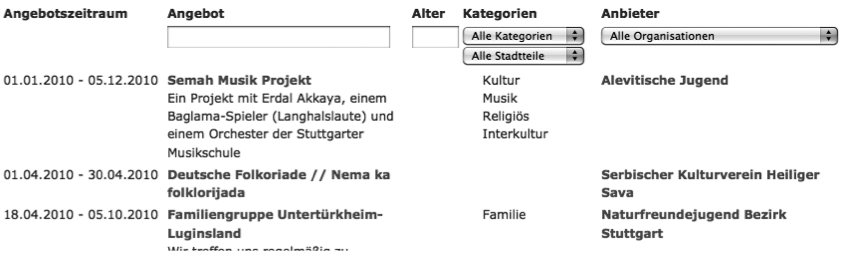
Figure 7-2: The buildup of the "demand" in a form above the offer list.
Warning
Watch out, that you do not implement logic, which actually belongs in the domain, inside of the Controller. Concentrate on the mere Flow.
Tip
In real life you will often need similar functionality in some
or even all Controllers, the previously mentioned access control is a
good example. In our example extension we sourced it out to a
service object. Another possibility is to create
a basis Controller which extends the
ActionController of Extbase. Inside you
implement the shared functionality. Then the concrete controllers with
you Actions extend this Basis Controller again.
The Flow inside of a Controller is triggered from outside by TYPO3. For extensions which generate content for the frontend, this is usually done by a plugin, placed on the appropriate page. How to configure such a plugin you'll see in the following section: