Make Products Persistent
From the class
\MyVendor\StoreInventory\Domain\Model\Product, now we already can
generate instances – therefore concrete products with individual properties
– at script run time. These are available however only in volatile form in
the memory and are deleted by PHP after the page was produced completely by TYPO3.
So that the products are available over a longer time, we must
make it "permanent". Usually this happens in that they are stored into a
database. Therefore first of all we create the database table necessary for
that.
Tip
The creating of the database tables can be done by the Extension Builder.
TYPO3 CMS will do this for us if we register the corresponding SQL
command in the file EXT:store_inventory/ext_tables.sql:
CREATE TABLE tx_storeinventory_domain_model_product (
        uid int(11) unsigned DEFAULT '0' NOT NULL auto_increment,
        pid int(11) DEFAULT '0' NOT NULL,

        name varchar(255) DEFAULT '' NOT NULL,
        description text NOT NULL,
        quantity int(11) DEFAULT '0' NOT NULL,

        PRIMARY KEY (uid),
        KEY parent (pid)
);
This SQL command designs a new table with the corresponding columns.
The columns uid and pid serve to the internal administration. Our product
characteristics name, description and quantity appear as columns again.
The entries in the database are accessed by the Backend of TYPO3. The forms of the Backend are produced on the basis of a configuration, that is stored in a PHP array, the so-called Table-Configuration-Array (shortly TCA).
Tip
You find the documentation for the Table-Configuration-Array in the TCA Reference
Within the Extension we can access the data transparently by the repositories. "Transparently" means that we don't have to think about the type of the storage of the data when accessing the repositories.
So that the Backend know, how it should show the product data
in a form, we must configure this for the table in the file
EXT:store_inventory/Configuration/TCA/tx_storeinventory_domain_model_product.php.
The file returns an array with the all information, that TYPO3 needs to render the list and detail view for the records of this extension.
<?php
return [
        'ctrl' => [
                'title' => 'LLL:EXT:store_inventory/Resources/Private/Language/locallang_db.xlf:tx_storeinventory_domain_model_product',
                'label' => 'name',
                'iconfile' => 'EXT:store_inventory/Resources/Public/Icons/Product.svg'
        ],
        'columns' => [
                'name' => [
                        'label' => 'LLL:EXT:store_inventory/Resources/Private/Language/locallang_db.xlf:tx_storeinventory_domain_model_product.item_label',
                        'config' => [
                                'type' => 'input',
                                'size' => '20',
                                'eval' => 'trim'
                        ]
                ],
                'description' => [
                        'label' => 'LLL:EXT:store_inventory/Resources/Private/Language/locallang_db.xlf:tx_storeinventory_domain_model_product.item_description',
                        'config' => [
                                'type' => 'text',
                                'eval' => 'trim'
                        ]
                ],
                'quantity' => [
                        'label' => 'LLL:EXT:store_inventory/Resources/Private/Language/locallang_db.xlf:tx_storeinventory_domain_model_product.stock_quantity',
                        'config' => [
                                'type' => 'input',
                                'size' => '4',
                                'eval' => 'int'
                        ]
                ],
        ],
        'types' => [
                '0' => ['showitem' => 'name, description, quantity']
        ]
];
This file comprises several sections. In the section ctrl, basic characteristics are how the table name or the
statement which table column the label is supposed to be taken for the entries. In the section columns is described
for each table column how this in that is supposed to be shown in the Backend. The section type defines, in
which sequence the table columns are indicated, and like this where appropriate arranged.
To define the group name for the new record wizard for new records of this extension you have to use a language file
in the directory EXT:store_inventory/Resources/Private/Language/. The identifier extension.title is
hard-coded in the TYPO3 core and you have to use this to define your own text.
Tip
The possibilities to impact the TCA are immense. You can find a complete listing of all options at TYPO3 Core APIs.
<?xml version="1.0" encoding="UTF-8"?>
<xliff version="1.0">
        <file source-language="en" datatype="plaintext" original="messages" date="2017-11-27T17:38:32Z"
                  product-name="store_inventory">
                <header/>
                <body>
                        <trans-unit id="extension.title">
                                <source>Store Inventory Records</source>
                        </trans-unit>
                        <trans-unit id="tx_storeinventory_domain_model_product">
                                <source>Product</source>
                        </trans-unit>
                        <trans-unit id="tx_storeinventory_domain_model_product.item_label">
                                <source>Item Label</source>
                        </trans-unit>
                        <trans-unit id="tx_storeinventory_domain_model_product.item_description">
                                <source>Item Description</source>
                        </trans-unit>
                        <trans-unit id="tx_storeinventory_domain_model_product.stock_quantity">
                                <source>Stock Quantity</source>
                        </trans-unit>
                </body>
        </file>
</xliff>
Attention
In TYPO3 7 the configuration was stored in the Array $GLOBALS['TCA']
in the file EXT:store_inventory/ext_tables.php, but the TCA configuration was
moved to a file with the database table name suffixed with the file extension .php as filename.
So here the Coding Guidelines can't be applied, which says filenames has to be in UpperCamelCase.
If you later want to overwrite the TCA from an existing database table, then you must use the file EXT:store_inventory/Configuration/TCA/Overrides/[tablename].php.
After we installed the extension, we can create our first products in the backend.
Like shown in image 4-2, we create a sys folder that takes the products (see 1 in figure 4-2). In this, we put some few new inventory data (see 2 in figure 4-2 and 3 in 4-3).
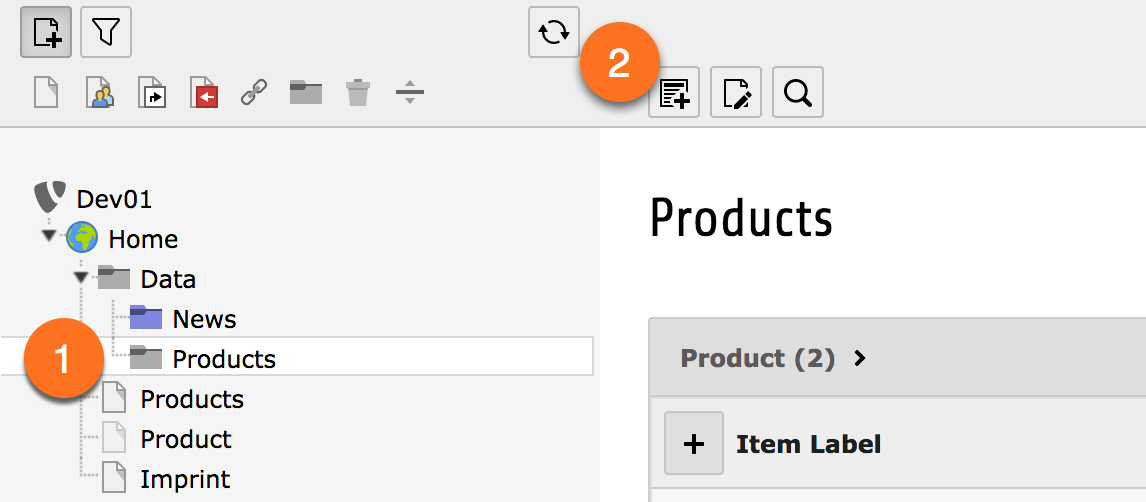
Figure 4-2: Create a new product
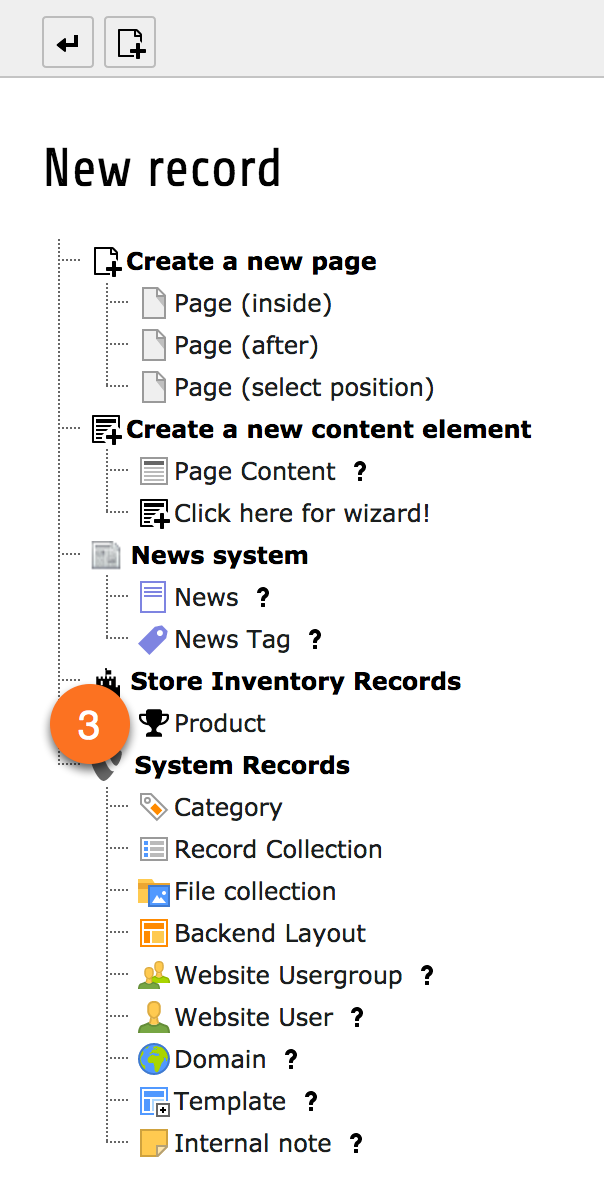
Figure 4-3: The new record wizard.
In this section we create a copy (or a model) of the reality, as we transferred only a part of the properties of the real products in software, that play a role in our domain. This model, which is abstracted of the real world, is completely designed with this.
In order to access the objects created in the backend, we create
a Repository for the products. The
MyVendor\StoreInventory\Domain\Repository\ProductRepository is an
object, in that the products are discarded. We can request a Repository to find all (or
certain) products and deliver it to us. The Repository class is very short
in our case:
<?php

namespace MyVendor\StoreInventory\Domain\Repository;

use TYPO3\CMS\Extbase\Persistence\Repository;

/**
 * Class ProductRepository
 *
 * @package MyVendor\StoreInventory\Domain\Repository
 */
class ProductRepository extends Repository
{

}
Our ProductRepository must be derived by
\TYPO3\CMS\Extbase\Persistence\Repository and inherits by this all methods. It can
remain empty therefore in our simple example. We put the class file
ProductRepository.php into the directory EXT:store_inventory/Classes/Domain/Repository/.