Backend Module API
Registering new modules
Modules added by extensions are registered in the ext_tables.php
using the following API:
// Module System > Backend Users
\TYPO3\CMS\Extbase\Utility\ExtensionUtility::registerModule(
    'TYPO3.CMS.Beuser',
    'system',
    'tx_Beuser',
    'top',
    [
        'BackendUser' => 'index, addToCompareList, removeFromCompareList, compare, online, terminateBackendUserSession',
        'BackendUserGroup' => 'index'
    ],
    [
        'access' => 'admin',
        'icon' => 'EXT:beuser/Resources/Public/Icons/module-beuser.svg',
        'labels' => 'LLL:EXT:beuser/Resources/Private/Language/locallang_mod.xlf',
    ]
);
Here the module tx_Beuser is declared as being a submodule of main module system.
It should be placed at the top of that main module, if possible (if several modules
are declared at the same position, the last one wins). The following positions are possible:
top: the module is prepended to the top of the submodule listbottomor empty string: the module is appended to the end of the submodule listbefore:<submodulekey>: the module is inserted before the submodule identified by<submodulekey>after:<submodulekey>: the module is inserted after the submodule identified by<submodulekey>
The last array is the module configuration and contains important information: the module is accessible only to admin users. The following options are available and should be defined as comma-separated string:
admin: the module is accessible to admins onlyuser: the module can be made accessible per usergroup: the module can be made accessible per usergroup
The configuration also contains pointers to the module icon and the
language file containing labels like the module title and description,
for building the module menu and for the display of information in the
About Modules module (found in the main help menu in the top bar).
The LLL: prefix is mandatory here and is there for historical reasons.
Registering a toplevel module
Toplevel modules like "Web" or "File" are registered with the same API:
\TYPO3\CMS\Extbase\Utility\ExtensionUtility::registerModule(
    'Vendor.MyExtension',
    'mysection',
    '',
    '',
    [],
    [
        'access' => '...',
        'icon' => '...',
        'labels' => '...',
    ]
);
This adds a new toplevel module mysection. This identifier can now
be used to add submodules to this new toplevel module:
\TYPO3\CMS\Extbase\Utility\ExtensionUtility::registerModule(
    'Vendor.MyExtension',
    'mymodule1',
    'mysection',
    '',
    [],
    [
        'access' => '...',
        'labels' => '...'
    ]
);
$TBE_MODULES
When modules are registered, they get added to a global array called
$GLOBALS['TBE_MODULES']. It contains the list of all registered
modules, their configuration and the configuration of any existing
navigation component (the components which may be loaded into the
navigation frame).
$GLOBALS['TBE_MODULES'] can be explored using the
SYSTEM > Configuration module.
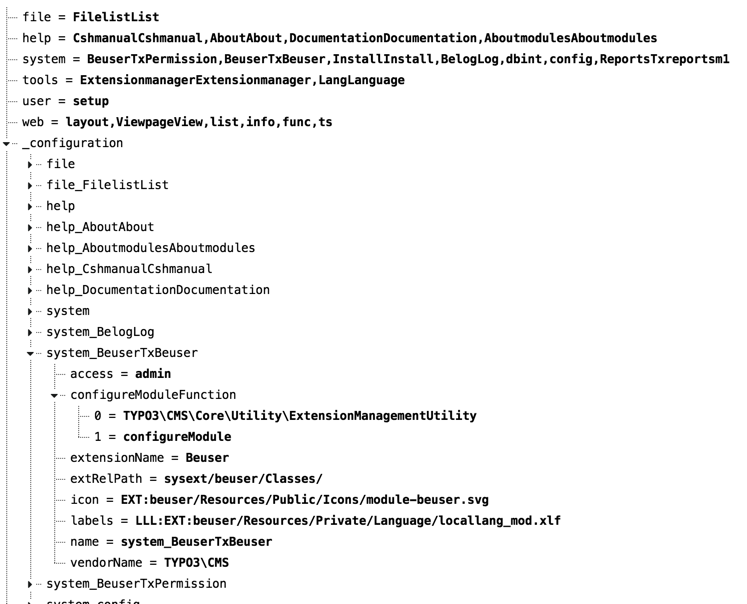
The list of modules is parsed by the class \TYPO3\CMS\Backend\Module\ModuleLoader.