type = 'imageManipulation'
Introduction
The type "imageManipulation" generates a button showing an image cropper in the backend for image files. It is typically only used in FAL relations. The crop information is stored as an JSON array into the field.
Examples
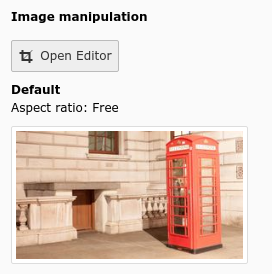
Image manipulation button in FAL
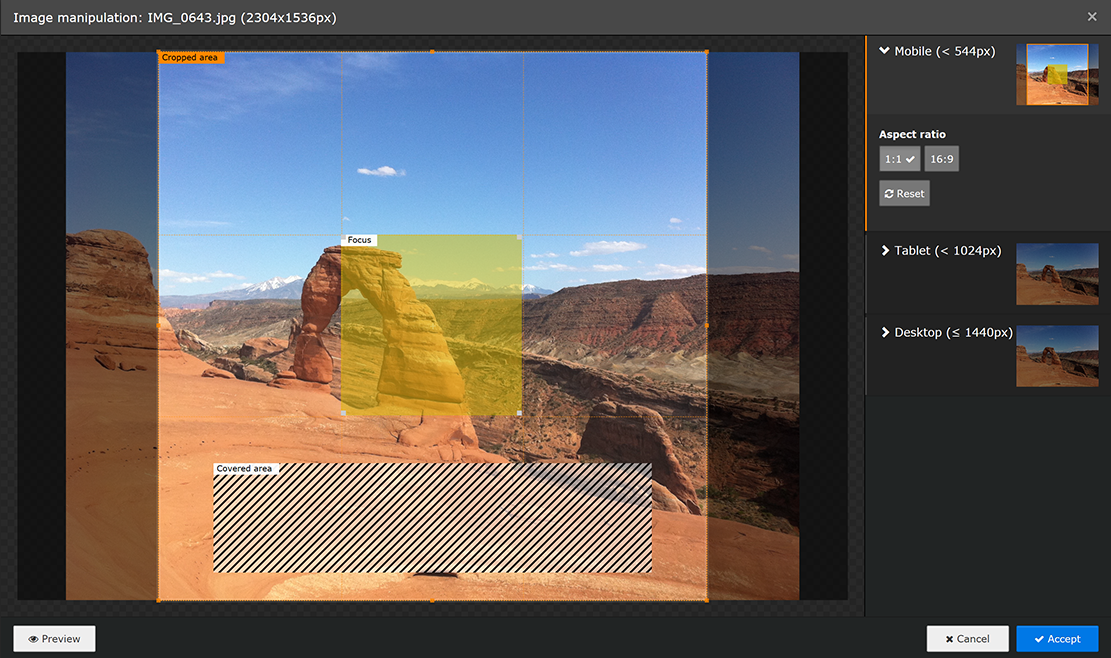
Image manipulation cropper modal
'crop' => [
    'label' => 'LLL:EXT:lang/Resources/Private/Language/locallang_tca.xlf:sys_file_reference.crop',
    'config' => [
        'type' => 'imageManipulation',
    ],
],
renderType default
file_field
- Datatype
- string (field name)
- Scope
- Proc. / Display
- Description
- Name of the database field that contains the uid of the file record. By default set to
uid_local.
behaviour
- Datatype
- array
- Scope
- Proc.
- Description
- The behaviour array contains various sub properties to specify processing options like localization overlay behaviour and children behaviour for relation types. Available properties vary by type and renderType combination.
allowLanguageSynchronization
- Datatype
- boolean
- Scope
- Proc.
- Description
- Default false. Allows an editor to select in a localized record if the value is copied over from default or source
language record, or if the field has an own value in the localization.
If set to true, and if the table supports localization and if a localized record is edited, this setting enables
FieldWizard LocalizationStateSelector:
Two or three radio buttons shown below the field input.
The state of this is stored in a json encoded array in the database table called
l10n_state. It tells the DataHandler which fields of the localization records should be kept in sync if the underlying default or source record changes.
cropVariants
- Datatype
- array
- Scope
- Proc. / Display
- Description
Main crop, focus area and cover area configuration.
Default configuration:
'cropVariants' => [
    'default' => [
        'title' => 'LLL:EXT:lang/Resources/Private/Language/locallang_wizards.xlf:imwizard.crop_variant.default',
        'allowedAspectRatios' => [
            '16:9' => [
                'title' => 'LLL:EXT:lang/Resources/Private/Language/locallang_wizards.xlf:imwizard.ratio.16_9',
                'value' => 16 / 9
            ],
            '3:2' => [
                'title' => 'LLL:EXT:lang/Resources/Private/Language/locallang_wizards.xlf:imwizard.ratio.3_2',
                'value' => 3 / 2
            ],
            '4:3' => [
                'title' => 'LLL:EXT:lang/Resources/Private/Language/locallang_wizards.xlf:imwizard.ratio.4_3',
                'value' => 4 / 3
            ],
            '1:1' => [
                'title' => 'LLL:EXT:lang/Resources/Private/Language/locallang_wizards.xlf:imwizard.ratio.1_1',
                'value' => 1.0
            ],
            'NaN' => [
                'title' => 'LLL:EXT:lang/Resources/Private/Language/locallang_wizards.xlf:imwizard.ratio.free',
                'value' => 0.0
            ],
        ],
        'selectedRatio' => 'NaN',
        'cropArea' => [
            'x' => 0.0,
            'y' => 0.0,
            'width' => 1.0,
            'height' => 1.0,
        ],
    ],
]
Above configuration is a fall back if no other more specific configuration has been given.
It is possible to define multiple crop variants. The array key is used as identifier for the ratio and the label is specified with the "title" and the actual (floating point) ratio with the "value" key. The value must be of PHP type float, not only a string.
'config' => [
    'type' => 'imageManipulation',
    'cropVariants' => [
        'mobile' => [
            'title' => 'LLL:EXT:ext_key/Resources/Private/Language/locallang.xlf:imageManipulation.mobile',
            'allowedAspectRatios' => [
                '4:3' => [
                    'title' => 'LLL:EXT:lang/Resources/Private/Language/locallang_wizards.xlf:imwizard.ratio.4_3',
                    'value' => 4 / 3
                ],
                'NaN' => [
                    'title' => 'LLL:EXT:lang/Resources/Private/Language/locallang_wizards.xlf:imwizard.ratio.free',
                    'value' => 0.0
                ],
            ],
        ],
        'desktop' => [
            'title' => 'LLL:EXT:ext_key/Resources/Private/Language/locallang.xlf:imageManipulation.desktop',
            'allowedAspectRatios' => [
                '4:3' => [
                    'title' => 'LLL:EXT:lang/Resources/Private/Language/locallang_wizards.xlf:imwizard.ratio.4_3',
                    'value' => 4 / 3
                ],
                'NaN' => [
                    'title' => 'LLL:EXT:lang/Resources/Private/Language/locallang_wizards.xlf:imwizard.ratio.free',
                    'value' => 0.0
                ],
            ],
        ],
    ]
]
It is also possible to define an initial crop area. If no initial crop area is defined, the default selected crop area will cover the complete image. Crop areas are defined relatively with floating point numbers. The x and y coordinates and width and height must be specified for that. The below example has an initial crop area in the size the previous image cropper provided by default.
'config' => [
    'type' => 'imageManipulation',
    'cropVariants' => [
        'mobile' => [
            'title' => 'LLL:EXT:ext_key/Resources/Private/Language/locallang.xlf:imageManipulation.mobile',
            'cropArea' => [
                'x' => 0.1,
                'y' => 0.1,
                'width' => 0.8,
                'height' => 0.8,
            ],
        ],
    ],
]
Users can also select a focus area, when configured. The focus area is always inside the crop area and marks the area in the image which must be visible for the image to transport its meaning. The selected area is persisted to the database but will have no effect on image processing. The data points are however made available as data attribute when using the
<f:image />view helper.The below example adds a focus area, which is initially one third of the size of the image and centered.
'config' => [
    'type' => 'imageManipulation',
    'cropVariants' => [
        'mobile' => [
            'title' => 'LLL:EXT:ext_key/Resources/Private/Language/locallang.xlf:imageManipulation.mobile',
            'focusArea' => [
                'x' => 1 / 3,
                'y' => 1 / 3,
                'width' => 1 / 3,
                'height' => 1 / 3,
            ],
        ],
    ],
]
Very often images are used in a context, where there are overlaid with other DOM elements like a headline. To give editors a hint which area of the image is affected, when selecting a crop area, it is possible to define multiple so called cover areas. These areas are shown inside the crop area. The focus area cannot intersect with any of the cover areas.
'config' => [
    'type' => 'imageManipulation',
    'cropVariants' => [
        'mobile' => [
            'title' => 'LLL:EXT:ext_key/Resources/Private/Language/locallang.xlf:imageManipulation.mobile',
            'coverAreas' => [
                [
                    'x' => 0.05,
                    'y' => 0.85,
                    'width' => 0.9,
                    'height' => 0.1,
                ]
            ],
        ],
    ],
]
fieldControl
- Datatype
- array
- Scope
- Display
- Description
- Show action buttons next to the element. This is used in various type's to add control buttons right next to the main element. They can open popus, switch the entire view and other things. All must provide a "button" icon to click on, see FormEngine docs for more details. See type=group for examples.
fieldInformation
- Datatype
- array
- Scope
- Display
- Description
- Show information between an element label and the main element input area. Configuration works identical to the "fieldWizard" property, no default configuration in the core exists (yet). In contrast to "fieldWizard", HTML returned by fieldInformation is limited, see FormEngine docs for more details.
fieldWizard
- Datatype
- array
- Scope
- Display
- Description
Specifies wizards rendered below the main input area of an element. Single type / renderType elements can register default wizards which are merged with this property.
As example, type='check' comes with this default wizards configuration:
protected $defaultFieldWizard = [
    'localizationStateSelector' => [
        'renderType' => 'localizationStateSelector',
    ],
    'otherLanguageContent' => [
        'renderType' => 'otherLanguageContent',
        'after' => [
            'localizationStateSelector'
        ],
    ],
    'defaultLanguageDifferences' => [
        'renderType' => 'defaultLanguageDifferences',
        'after' => [
            'otherLanguageContent',
        ],
    ],
];
This is be merged with the configuration from TCA, if there is any. Below example disables the default
localizationStateSelectorwizard.'aField' => [ 'config' => [ 'fieldWizard' => [ 'localizationStateSelector' => [ 'disabled' => true, ], ], ], ],
It is possible to add own wizards by adding them to the TCA of the according field and pointing to a registered renderType, to resort wizards by overriding the
beforeandafterkeys, to hand over additional options in the optionaloptionsarray to specific wizards, and to disable single wizards using thedisabledkey. Developers should have a look at the FormEngine docs for details.
defaultLanguageDifferences
- Datatype
- array
- Scope
- fieldWizard
- Description
Show a "diff-view" if the content of the default language record has been changed after the translation overlay has been created. The ['ctrl'] section property transOrigDiffSourceField has to be specified to enable this wizard in a translated record.
This wizard is important for editors who maintain translated records: They can see what has been changed in their localization parent between the last save operation of the overlay.
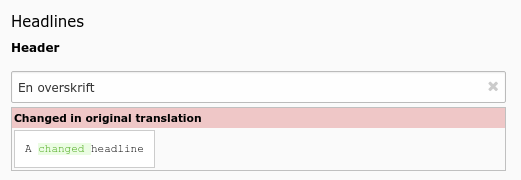
A field has been changed in default language record
localizationStateSelector
- Datatype
- array
- Scope
- fieldWizard
- Description
The localization state selector wizard displays two or three radio buttons in localized records saying: "This field has an own value distinct from my default language or source record", "This field has the same value as the default language record" or "This field has the same value as my source record". This wizard is especially useful for the
tt_contenttable. It will only render, if:- The record is a localized record (not default language)
- The record is in "translated" (connected), but not in "copy" (free) mode
- The table is localization aware using the ['ctrl'] properties languageField, transOrigPointerField. If the optional property translationSource is also set, and if the record is a translation from another localized record, the third radio appears.
- The property ['config']['behaviour']['allowLanguageSynchronization'] is set to true
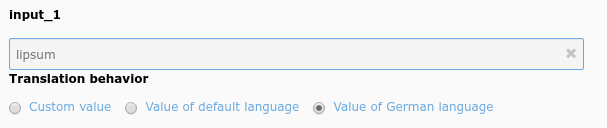
Example localization state selector on an type=input field
otherLanguageContent
- Datatype
- array
- Scope
- fieldWizard
- Description
Show values from the default language record and other localized records if the edited row is a localized record. Often used in
tt_contentfields. By default, only the value of the default language record is shown, values from further translations can be shown by setting the userTsConfig property additionalPreviewLanguages.The wizard shows content only for "simple" fields. For instance, it does not work for database relation fields, and if the field is set to
readOnly. Additionally, the table has to be language aware by setting up the according fields in ['ctr'] section.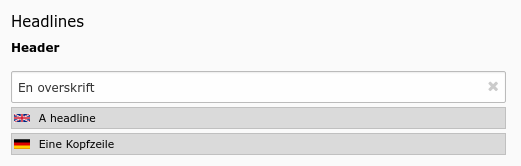
Header field showing values from two other languages
allowedExtensions
- Datatype
- string (list of file extensions)
- Scope
- Proc. / Display
- Description
- List of image types (by file extension) which can be cropped. Defaults to
$GLOBALS['TYPO3_CONF_VARS']['GFX']['imagefile_ext']which is usuallygif,jpg,jpeg,png.
readOnly
- Datatype
- boolean
- Scope
- Display
- Description
Renders the field in a way that the user can see the values but cannot edit them. The rendering is as similar as possible to the normal rendering but may differ in layout and size.
Warning
This property affects only the display. It is still possible to write to those fields when using the DataHandler.